

Author: Arran Saunders at Gas Engineer Software
You've passed your ACS gas assessments and you're on the Gas Safe Register. Now comes the decision every newly qualified gas engineer faces: join an established company, or go out on your own. Most new heating & plumbing sole traders don't struggle with the work on the tools, but with the admin wrapped around it such as creating quotes, filing certificates, sending invoices, and updating their diary.
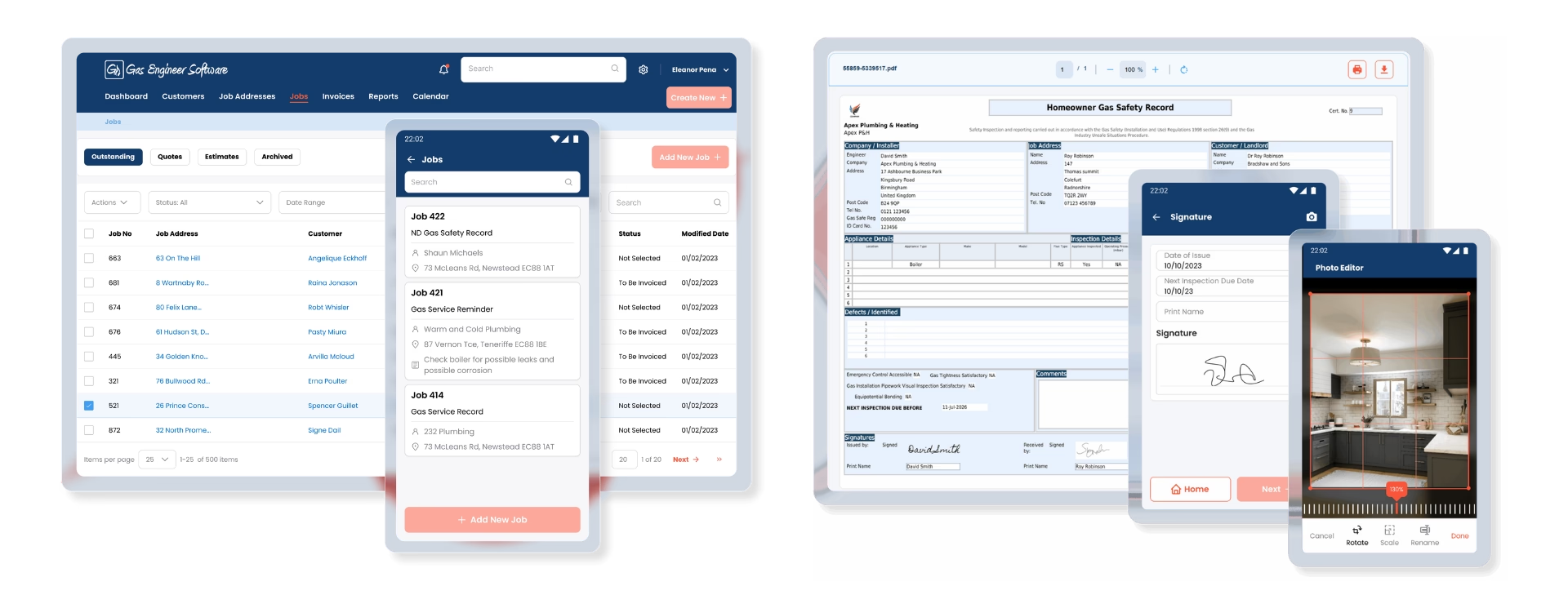
This article explains what job management software actually is, what it does, and how it saves you time and money once you’re running your own operation.
What is job management software, exactly?
Job management software is a single system that handles the running of a trades business: what’s the job, when, for whom, and whether you’ve been paid for it. For a gas engineer, that usually means scheduling, customer records, gas safety certificates, quotes, invoices and payment tracking, all in one place and all accessible on site.
You might also hear it called field service management software or a job management app. Same idea. The point is that everything connected to a job lives in one place instead of being scattered across a paper diary, a notebook of customer numbers, a pad of certificates in the van, and a separate invoicing app you only open on a Sunday night.
The real cost of doing it all manually
When you’re a one-van operation, a paper diary, a spreadsheet and a Word invoice template feel free, but they aren’t. The cost just hides in your free time.
For a single boiler service, you add the job in your calendar, drive out, do the work, and fill in a certificate. Then, you go back home, log the job, copy their details into an invoice template, email it, and set a reminder to follow up when their gas service due date is approaching.
Multiply that across your week, and you can see how the admin work stacks up.
The hidden costs usually fall into three buckets:
- Time: hours spent on admin you can’t bill for
- Money: late invoices, forgotten chases, and jobs you didn’t follow up on
- Risk: missing records, compliance gaps, and renewals that catch you out
What job management software actually does
The features vary between platforms, but the core jobs-to-be-done are consistent. Here’s what you’re actually getting.
1. Scheduling and job tracking
A shared, digital diary you can see from anywhere. You book a job, it’s on the calendar, and the details (address, what needs doing, customer history) travel with it.
2. Gas safety certificates and records
Instead of carrying pads of paper, you issue gas safety certificates from your phone or tablet. They’re stored, timestamped and emailed to the customer on-site, and every record is in one place, searchable, and impossible to lose in the van.
3. Quotes and invoices
Build a professional quote from templated line items, and turn the completed job into an invoice in seconds. Looking professional matters, and a branded invoice that lands the same gives a great impression.
4. Chasing payments automatically
Late payers are the bane of every sole trader. The better platforms will chase late payers automatically with polite reminders, so you get paid faster without having the awkward phone call or remembering to send the nudge yourself.
5. Talking to your accounting software
You’ll need to handle your books and, before long, your VAT and Self Assessment. Most job management platforms sync with accounting software like Xero or QuickBooks, so an invoice you raise on site flows straight through to your accounts without being typed in twice.
How this saves you time and money
The real value comes from these features working together. You stop re-typing the same information, you get to focus on the work you get paid for, and the admin that used to eat a couple of evenings a week shrinks to minutes between jobs.
You get paid faster, because invoices go out the day the work’s done and chase themselves. You lose fewer jobs, because service reminders go out automatically and bring repeat work back round. And you carry far less risk, because every certificate and record is stored, backed up and findable in seconds.
What to look for when choosing software
Not all platforms are equal, and the right one depends on how you work. A few things worth checking before you commit:
- Built for gas, not generic: Make sure it has the actual certificates you issue, not a generic form you have to bodge.
- Works offline: You’ll be in plant rooms and basements with no signal; the app needs to keep working and sync later.
- Genuinely mobile: You’re filling things in on site, so the phone and tablet experience matters more than the desktop one.
- Accounting integration: Check it connects to the books software you use or plan to use.
- A free trial: Never buy trade software you haven’t used on a real job first.
All Logic4training new entrant gas candidates get free access to Gas Engineer Software during their course and for 6 months after, while existing Logic4training customers qualify for 6 months free to help with starting their business. Click here for more information.
The bottom line
Job management software won’t fix a boiler for you, but it will take the business admin that drains your evenings and shrink it down to a few taps between jobs. For a newly qualified gas engineer setting up on their own, getting this right early means you spend your time on the tools and getting paid and not buried in paperwork.



 Your latest offers & alerts